
How to Make Zalgo Text: Choose Marks and Check Your Paste
Compare actual Zalgo presets and Glitch sliders, inspect exact mark sequences and lengths, distinguish Discord fields and keep an original for recovery.

Written by Saurabh Kumar
Founder & maintainer of TextToolbox
- Published:
- Last edited:
What the generator does with one phrase
Use the Glitch and Zalgo Text Generator with one source phrase. Choose Zalgo presets to compare eight outputs, or Manual counts to set exact bank counts. The tool creates static Unicode text; it does not install a font, animate the output or verify a social account name.
Keep a plain copy first. For a fictional error label, try Signal Lost and compare the result with the original. Leave an actual instruction such as Reconnect the cable in ordinary text so the message stays understandable if decoration is clipped or announced poorly.
The controls, and what their counts mean
- Compare Zalgo intensity (Light, Medium, Heavy, Extreme, Chaos): probability-gated attempts. The total added-entry caps are 5, 10, 15, 23 and 33 per non-whitespace source cluster, and the minimum is zero.
- Explore one Zalgo bank (Above Only, Below Only, Mixed Pool Only): Above and Below append 2 to 5 entries, Mixed appends 1 to 3, and every selected entry is appended.
- Set exact Glitch counts (Above bank, Below bank, Mixed pool): each slider appends 0 to 10 entries per non-whitespace source cluster. Four presets set starting counts and keep both toggles.
- Change Glitch source order (Reverse source order, Insert extra spacing): reverse the whole-source cluster order, including line order, or insert one space only between adjacent non-whitespace clusters.
- Enter your phrase in Original text. Sample replaces it with a stored example and rerolls marks.
- Select Zalgo presets to compare named outputs. Select Manual counts to start with Mild or move the three sliders; set all three to zero to inspect the source-order controls without marks.
- Choose Regenerate to reroll the selection. It can repeat. Changing the seed does not guarantee a visibly different string.
- Copy the chosen output. If Copy fails, select its read-only output field and copy manually.
- Check the saved or sent result in the actual receiving field before publishing.
Switching modes keeps the source, seed and manual slider/toggle choices. Preset mode uses its own eight recipes; the manual toggles do not apply to those outputs. A mode change clears Copy feedback, including pending writes.
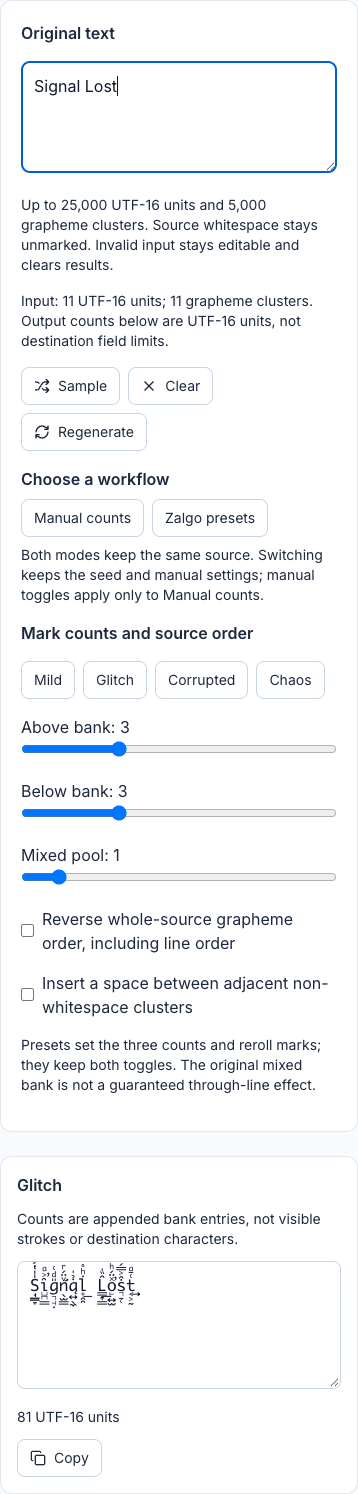
Read or copy the complete captured result
Original: Signal Lost. Above 3, Below 3, Mixed 1; reverse and extra spacing off.
S̘̳̞̍̍̔́ȋ̺̪͇͐ͣ̕g͉̘̣̎ͩ͑͏n̛̖̫̳ͮ̈́ͬą͍̖̼̇̉̍l̟̯̯̇ͪ̊͟ L͇͎̳͂̏̍͟o̙͍̫̽̈́ͪ̕s͉̠̜͒͐̿́t͔͕̰͑̄ͣ͢These controls do not provide generic Low/Medium/High settings. Chaos in Glitch is a preset of 8/8/4; the sliders can go higher. Counts describe appended entries, not a promise of readability or visible strokes.
Inspect a complete example rather than a visual intensity label
The following are exact possible bank draws. Random UI results can differ, so inspect the complete sequence rather than trying to reproduce the appearance from a screenshot.
| Input and selected entries | Complete output | UTF-16 units |
|---|---|---|
| A, two U+030D above-bank entries | A̍̍ | 1 input, 3 output |
| A, two U+0316 below-bank entries | A̖̖ | 1 input, 3 output |
| A, one U+034F mixed-bank entry | A͏ | 1 input, 2 output; the joiner has no visible glyph |
| a plus existing U+0301, two U+030D entries | á̍̍ | 2 input, 4 output; original accent retained |
U+030D is COMBINING VERTICAL LINE ABOVE; U+0316 is COMBINING GRAVE ACCENT BELOW. The Unicode combining-mark chart also identifies U+034F COMBINING GRAPHEME JOINER. The mixed bank contains several positions and overlays, including U+0489 COMBINING CYRILLIC MILLIONS SIGN from the Cyrillic chart. Calling it a “Through” bank would imply geometry the entries do not guarantee.
The generators append entries after whole non-whitespace source grapheme clusters. An existing accent or joined emoji sequence stays contiguous. Spaces, tabs and physical line-break clusters stay unmarked. Glitch reversal intentionally changes whole-source order; zero-mark A😀B becomes B😀A. Spacing alone changes zero-mark AB CD to A B C D, keeping the original space.
For Discord, distinguish the receiving field
Discord's official username and display-name guide restricts account usernames to lowercase Latin letters, digits, underscore and period. A combining-mark effect is therefore unsuitable for that account-username field.
Display names permit broader characters, but that does not certify every Zalgo sequence. Server nicknames are another field and can override a display name. Check the actual field and its validation; do not infer an account-username rule from how a chat message looks.
Try a short draft first. Inspect the saved name or sent message for clipped marks, wrapping, missing glyphs and errors. Keep essential names and navigation readable. Desktop, mobile, fonts and assistive reading need actual checks; “valid Unicode” is not a guarantee of full-intensity rendering without clipping.
Recover without deleting meaningful accents
If a sample becomes difficult to read, start again from the plain original with fewer entries. Regenerating already decorated text adds another layer because existing marks are retained. Clear clears the source; it does not reset Glitch counts or toggles.
Unicode normalization defines composition and decomposition, not selective removal of Zalgo decoration. For example, NFD changes precomposed é into e followed by U+0301. Deleting every mark then produces e, losing an original accent. Blanket deletion can also remove meaningful marks in other scripts. The generated string does not say which entries were original, so an automatic cleanup cannot promise exact recovery.
Input is limited to 25,000 UTF-16 units and 5,000 source grapheme clusters. Oversized input stays editable and clears results without being shortened. Unsupported controls, incomplete Unicode or missing segmentation support produce a visible error. Copy success reports the clipboard write, not acceptance by another app. Local UTF-16 counts are not the receiving field's character budget.
Keep the comparison useful
Use Weird Text Generator when you want to compare combining marks with five other text operations. Use Diagonal Text Generator for a staircase layout or Upside Down Text Generator for its separate flipped-and-reversed workflow. These alternatives solve different tasks; they are not compatibility guarantees.
For terminology and exact code points, see Zalgo Text in the glossary. Prefer a short readable effect with a plain fallback over a long sequence whose meaning depends on decoration.
Reviewed October 14, 2026 against the Glitch/Zalgo workbench, the Weird comparison and the linked references. No browser, font or receiving platform is certified.
Recommended articles
Guide
How to Copy and Paste Symbols: Choose, Check and Troubleshoot
Choose a symbol collection, check lookalike characters and follow exact search examples. Learn how to paste reliably and troubleshoot display or field restrictions.
Guide
Cursive Text Copy and Paste: Script Rows, Examples and Limits
Compare actual Script Bold and Math Script outputs, preserve spelling and choose a lettering workflow. Check the receiving field and keep an ordinary original.