
Cursive Text Copy and Paste: Script Rows, Examples and Limits
Compare actual Script Bold and Math Script outputs, preserve spelling and choose a lettering workflow. Check the receiving field and keep an ordinary original.

Written by Saurabh Kumar
Founder & maintainer of TextToolbox
- Published:
- Last edited:
Script characters or a script font?
For a copyable script-character draft, open the Font Generator, choose Cursive comparison, enter a short phrase and compare Script Bold with Math Script. Copy the chosen result and check it in the receiving field. Keep the ordinary original for recovery.
If you are designing a document or image and can choose a font, use ordinary text with a script font instead. Character substitution does not produce handwriting, install a typeface or create a lettering design.
What the script characters are
Unicode's mathematical alphabets include script letters, with some characters already encoded in the Letterlike Symbols block. They are not a separate “Mathematical Script block” starting at U+1D400, and they are not Fraktur. The Unicode 17 reference chapter explains the relationship between these sets and advises against using mathematical alphanumerics for ordinary text styling. Native font or formatting controls preserve ordinary spelling when they are available.
For example, ℋ is U+210B SCRIPT CAPITAL H; 𝓗 is U+1D4D7 MATHEMATICAL BOLD SCRIPT CAPITAL H. Their shapes may vary with the font. Neither character proves that the text will look handwritten in someone else's app.
The Cursive comparison, row by row
Font Generator’s Cursive comparison has eight named outputs. Script Bold and Math Script are the script options; Math Bold and Math Bold Italic are comparison styles. Borders, mixed styles and title casing are additional transformations, not new handwriting alphabets.
| Input | Actual row | Complete output |
|---|---|---|
| Hello | Script Bold | 𝓗𝓮𝓵𝓵𝓸 |
| Hello | Math Script | ℋℯ𝓁𝓁ℴ |
| Hello | Math Bold | 𝐇𝐞𝐥𝐥𝐨 |
| café | Script Bold | 𝓬𝓪𝓯é |
| ßHELLO | Title Case Script | ß𝓗𝓮𝓵𝓵𝓸 |
Cursive comparison, Script Bold. Input: Hello
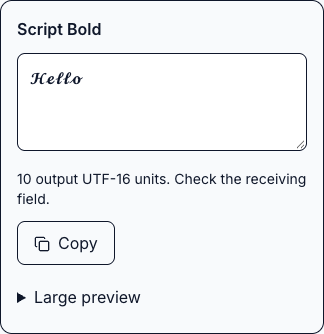
Same view and row. Input: café
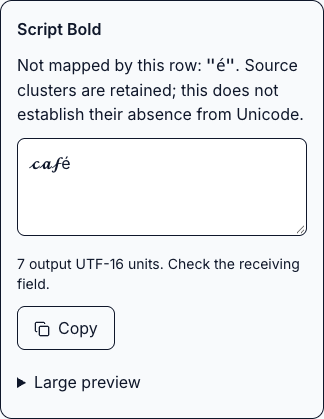
𝓗𝓮𝓵𝓵𝓸 and 𝓬𝓪𝓯é. The second capture shows the row’s own warning: the accented letter stays ordinary. These are local character substitutions, not handwriting samples or receiving-app tests.The last row shows the tool's ASCII casing recipe. It keeps the unsupported prefix and changes the first supported letter. This is not language-aware title editing. Keep accents and non-Latin spelling even when some letters remain ordinary.
Copy it and keep a way back
- Save the original phrase outside the generator.
- Enter it in Font Generator’s Cursive comparison and compare the full outputs. Start with an unframed script row when you want letters without extra border characters.
- Use Copy on the selected row. If permission or clipboard access fails, manually select the output and copy it.
- Paste into the intended field and check its validation. A display name, account username, message and document are different contexts.
- Check the saved result and restore the original if it is rejected, clipped or hard to read.
If your destination has its own formatting controls, those may meet the task without changing character identities. The cross-platform formatting guide explains that choice.
Which method fits the job
- A short decorative phrase: compare Script Bold and Math Script, then check field acceptance and the saved appearance.
- A document heading or email signature: use ordinary text with the font controls you have, and keep a readable fallback for the recipient.
- An account handle: use ordinary text that follows that service's rules. Do not infer handle rules from display names.
- Tattoo or custom lettering: ask a designer or artist for actual lettering. A Unicode sample is only a style reference.
The local samples verify character sequences, not rendering in Instagram, Discord, WhatsApp or email clients. Boxes, changed shapes and odd reading behavior are reasons to use the ordinary version. No fixed screen-reader pronunciation or search-ranking outcome was measured here.
Use ordinary text for essential contact details, instructions and names readers need to find. Switch to All styles in Font Generator for broader comparisons; that does not mean any destination will approve the output. For supported substitutions, Revert Unicode Text can help recover letters, but check the result against your original.
Recommended articles
Guide
How to Make Zalgo Text: Choose Marks and Check Your Paste
Compare actual Zalgo presets and Glitch sliders, inspect exact mark sequences and lengths, distinguish Discord fields and keep an original for recovery.
Guide
How to Copy and Paste Symbols: Choose, Check and Troubleshoot
Choose a symbol collection, check lookalike characters and follow exact search examples. Learn how to paste reliably and troubleshoot display or field restrictions.