
How to Copy and Paste Symbols: Choose, Check and Troubleshoot
Choose a symbol collection, check lookalike characters and follow exact search examples. Learn how to paste reliably and troubleshoot display or field restrictions.

Written by Saurabh Kumar
Founder & maintainer of TextToolbox
- Published:
- Last edited:
Which symbol, and where will it go?
Need a degree sign in a temperature, a right arrow in a note, or a star in a rating? Copy the character you need first, then check it in the field where you will use it. Unicode identifies the text; the receiving app and its fonts decide how it looks and whether the field accepts it.
A copied sign is different from a formatted equation, an interactive checkbox or an accessible interface control. For example, typing a checkmark into a note does not create a checkbox that someone can toggle. Keep words such as “Complete” alongside symbols when the meaning matters.
TextToolbox has curated collections rather than every Unicode character. These counts describe the current local collections, including emoji sequences where present.
| Task and tool | Available collection | Important limit |
|---|---|---|
| Direction: Arrow Symbol Generator | 68 arrows across eight category groups | Category and search filters intersect. Random chooses from visible results, not every arrow. |
| Heart text: Heart Symbol Generator | 20 heart entries and eleven decoration patterns | Copy a heart alone or decorate source text. This is a partial collection. |
| Rating or decoration: Star Symbol Generator | 25 entries and twelve patterns | The collection includes five classic stars and twenty original decorative entries; not every entry is a star. |
| Operator or Greek letter: Math Symbol Generator | 30 symbols and twelve decorative patterns | No equation evaluation, fraction editor or complete Greek alphabet. |
| Currency sign: Currency Symbol Generator | 20 signs and twelve decorative patterns | No exchange rates or locale-aware amount formatting. A dollar or yen sign alone does not identify a currency unambiguously. |
| Game notation: Card and Chess Symbol Generator | 30 entries: eight suits, twelve chess pieces and ten card/game symbols | The Full Cards pattern cycles four aces. It is not a full deck or chess engine. |
| Named emoji: Emoji Picker | 1,298 distinct curated strings, with Unicode 17 names | Not the complete Unicode emoji repertoire. A newer or modified sequence may be absent. |
Check identity before appearance
Similar shapes can be different characters. In mathematical writing, the summation operator and capital sigma are not interchangeable just because a font makes them look close. Search by the code point when you need an exact identity.
| Literal character | Code point | Unicode name and practical distinction |
|---|---|---|
∑ | U+2211 | N-ARY SUMMATION. An operator, available in the Math collection. |
Σ | U+03A3 | GREEK CAPITAL LETTER SIGMA. A letter, also available in Math. |
∆ | U+2206 | INCREMENT. The Math entry labelled Delta copies this character. |
Δ | U+0394 | GREEK CAPITAL LETTER DELTA. This comparison character is not in the current Math picker. |
★ | U+2605 | BLACK STAR. Available in the Star collection. |
✦ | U+2726 | BLACK FOUR POINTED STAR. A different star shape, also available there. |
The names and identities above come from the Unicode charts for Mathematical Operators, Greek and Coptic, Miscellaneous Symbols and Dingbats. Chart identity does not certify rendering in a particular app.
As explained in Unicode Emoji, some copied strings contain several code points. A heart with an emoji presentation selector, for example, is a different sequence from the same heart without that selector. Keep the complete selected string together. Do not remove an invisible character simply because it does not draw a separate shape.
Copy, paste and verify the result
- Open the relevant collection. Search by a name, a literal symbol or its displayed code point. For Arrow, also choose the category you want; a narrow category can hide an otherwise matching result.
- Select the exact entry. Copying one picker symbol is separate from copying a generated decoration containing your source text.
- Use Copy and read the feedback. If the browser denies clipboard access, select the supplied text and use your device's normal copy command. A visible result by itself does not mean the clipboard was updated. The Clipboard API documentation explains that a write can be denied.
- Paste into the actual receiving field. Inspect the complete text, including spaces and line breaks. For a public profile or message, save it and check the saved result too.
To repeat a lookup, search for the code point:
- Arrow, All category:
U+2192finds→, the rightwards arrow. This checks the lookup, not the arrow's size or colour. - Star:
U+2605finds★, the black star entry rather than an emoji star. - Math:
U+2211finds∑, summation rather than capital sigma. - Currency:
U+20B9finds₹, the Indian rupee sign alone and not a formatted price. - Card and Chess:
U+265Efinds♞, the black chess knight character and not a playable chess piece.
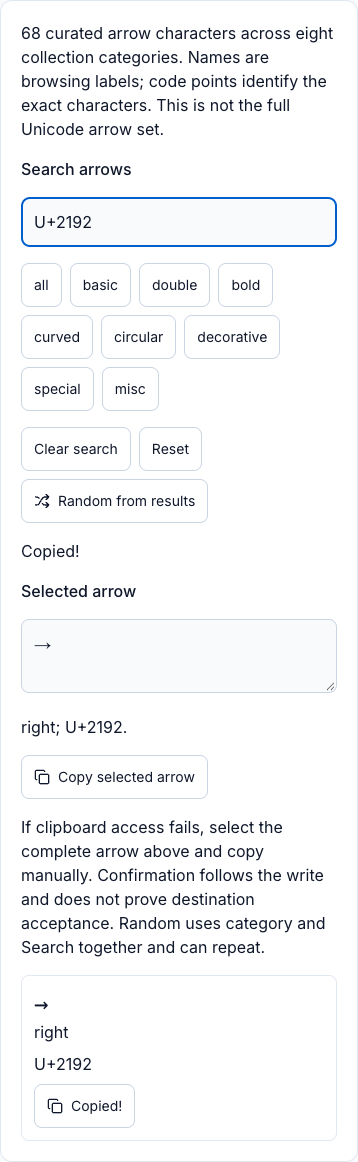
U+2192 finds one entry; the selected output is →, RIGHTWARDS ARROW. The displayed Copied feedback follows the local clipboard write attempt. It does not show a paste into another app or certify saved-field acceptance. The exact character and code point remain selectable in the table above.If your goal is a repeated section separator rather than one character, use the Text Symbol Divider Generator. It offers sixteen patterns and five export formats. Check the selected format: an HTML wrapper or fenced Markdown contains markup, while plain text is the divider itself.
Insert symbols with your device's character panel
For occasional characters, your operating system can be enough. Microsoft's Windows 11 keyboard guide describes pressing Windows key + period, then selecting Symbols in the panel. Click in an editable field before inserting a character.
On Mac, Apple's Character Viewer guide explains browsing and inserting symbols. In an app that provides it, choose Edit, then Emoji & Symbols. The viewer can be expanded to browse character groups.
On phones, the available symbols and long-press choices depend on the keyboard, language and app. Check your keyboard's symbol panel rather than assuming the same key produces the same sign on every iPhone or Android device. Desktop Alt codes and Option-key combinations also depend on the input setup; the panel is a clearer starting point than memorising a supposedly universal shortcut list.
Troubleshoot a changed or missing symbol
A box, a changed appearance and corrupted text are different symptoms. Start with a short test in the actual app, then compare what was copied with what was saved. The symptom alone does not prove one specific cause. Character encoding concerns the relationship between bytes and text, separately from the font that draws it.
- A box instead of the symbol: a font or renderer may lack the glyph or sequence support. Try another font where the app allows it, or an updated client, and use a plain word if the environment still cannot display it.
- The symbol looks different in another app: different fonts or emoji artwork can draw the same encoded text differently. Compare the character sequence before deciding the text changed, and check the destination rather than this page.
- A sign disappears after saving a username: the field may filter or reject characters. Read that platform's rules for the specific field; display names, account usernames and messages can differ.
- Unexpected letters or replacement characters after an import: the transfer may have decoded bytes incorrectly or lost information. Check the export and import encoding settings and return to the original source. Re-copying damaged text cannot reliably rebuild what is missing.
- The paste contains old text: the clipboard write may have failed, or another copy replaced it. Copy again, read the result, then paste into a short editable test field, and select by hand if access is denied.
For financial documents, include the currency code when ambiguity matters, such as USD 25. Correct sign placement, spacing and decimal separators depend on the currency and locale. Decorative currency patterns do not make a valid invoice format.
Keep symbols understandable
Use symbols where they save effort or convey a familiar meaning, and retain the words that explain the result. A star rating still needs a label such as “4 out of 5”; a direction in instructions benefits from “right” alongside the arrow. A screen reader's pronunciation and a platform's character limit cannot be inferred from how many shapes you see.
This guide helps choose and verify copied text. It does not promise acceptance in every bio, message, document or font. For important content, keep an undecorated original and test the final destination before sharing.
Recommended articles
Guide
How to Make Zalgo Text: Choose Marks and Check Your Paste
Compare actual Zalgo presets and Glitch sliders, inspect exact mark sequences and lengths, distinguish Discord fields and keep an original for recovery.
Guide
Cursive Text Copy and Paste: Script Rows, Examples and Limits
Compare actual Script Bold and Math Script outputs, preserve spelling and choose a lettering workflow. Check the receiving field and keep an ordinary original.