
Bold and Italic Instagram Bio Text: Compare and Check Your Draft
Compare exact bold and italic character outputs, preserve accents and check your saved bio. Understand field, rendering and copy limitations.

Written by Saurabh Kumar
Founder & maintainer of TextToolbox
- Published:
- Last edited:
Try one short phrase first
Bold or italic letters in an Instagram bio are easy to try: convert one short phrase, copy the output and paste it into the Bio field. Keep your ordinary version next to it. Instagram decides whether the sequence saves, and each reader's device decides how it looks.
This page compares the styles. If you are still working out what the bio should say, start with the bio editing guide. Styling cannot fix an unclear first line.
These are different characters, not bold formatting
A real bold setting changes how ordinary letters are drawn. These generators swap each letter for a different Unicode character instead, so no font is installed and no Instagram setting is switched on.
Unicode's discussion of mathematical alphabets explains why: those characters carry meaning beyond how they look, and Unicode advises against using them to style ordinary text. Where an editor offers native formatting, use that. For a decorative draft, keep names, contact details and instructions in ordinary letters.
The same text in four styles
These are complete outputs from the linked tools, checked on October 14, 2026. They are not screenshots from Instagram.
| Input | Tool and row | Complete output |
|---|---|---|
| Hello 2 | Bold: Sans-Serif Bold | 𝗛𝗲𝗹𝗹𝗼 𝟮 |
| Hello 2 | Bold: Serif Bold | 𝐇𝐞𝐥𝐥𝐨 𝟐 |
| Hello 2 | Bold: Serif Bold Italic | 𝑯𝒆𝒍𝒍𝒐 2 |
| Hello | Font: Math Italic | 𝐻𝑒𝑙𝑙𝑜 |
In Serif Bold Italic the digit stays ordinary, because that map does not replace it; each row covers different characters. A heavier look is no evidence that a bio will be easier to read, rank better or earn more follows.
For café, the Sans-Serif Bold row returns 𝗰𝗮𝗳é. The accent is kept as it was, not repaired or removed. An e followed by U+0301 COMBINING ACUTE ACCENT stays together as one unit in this tool; it is not treated like a plain ASCII e.
Copy it into your bio
- Write the full bio in ordinary text first, with correct spelling and accents.
- Open the Bold Text Generator for the bold rows above, or the Font Generator for Math Italic. Choose Italic comparison in Font Generator for a focused set; its Standard Italic row matches Math Italic in All styles, even though the names differ.
- Convert only the phrase you want to try. Read the complete output before you press Copy. If copying fails, select the output and copy it by hand.
- Paste it into your draft, then into Instagram's Bio editor. Go by what the field itself accepts, not by a count from a tool.
- If it saves, reopen the profile and check spelling, line breaks and appearance. Put the original back if anything looks wrong.
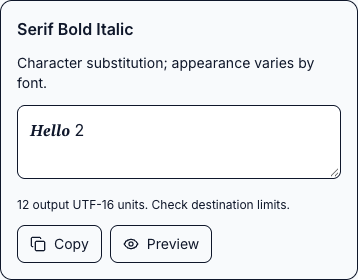
Hello 2. Complete Serif Bold Italic output: 𝑯𝒆𝒍𝒍𝒐 2, 12 UTF-16 units. The teal annotation points to the unchanged digit, U+0032. This is TextToolbox’s local tool, not an Instagram screenshot or a saved-profile test.Anything you type after the pasted sequence is ordinary text; the generator does not keep substituting for you.
If something looks wrong
- Some letters stay ordinary: check the selected row's coverage. Keep the correct spelling; do not strip accents to make it uniform.
- Boxes or unexpected shapes: try the ordinary original in the same field. A different font or device can display the same characters differently.
- The field rejects the draft: shorten it or restore ordinary text. A successful Copy does not mean the field will save it.
- Reading or searching becomes awkward: keep essential information in ordinary text. Speech and matching behavior depend on the software and the sequence.
The outputs above were checked against TextToolbox's own character maps. Whether Instagram saves them, how they look on phones and how screen readers read them were not tested, so no style here is certified for every bio, caption or username.
If you have lost the original, the Revert Unicode Text tool can undo some substitutions. Compare its result with the spelling you meant, because reversing is not guaranteed for every decorative sequence.
Recommended articles
Social Media
Social Text Styles: Native Formatting or Unicode Characters?
Compare WhatsApp message syntax with Unicode character drafts for social text fields. Use exact examples, preserve accents and troubleshoot copy or rendering limits.
Social Media
Discord Text Styling: Messages, Display Names and Limits
Choose native message formatting or a short Unicode display-name draft. Compare tested outputs, avoid unique-username mistakes and check the receiving field.